Tag: Software Engineering

  • How to Become a Better Developer, One Embarrassing Commit at a Time

    How to Become a Better Developer, One Embarrassing Commit at a Time

    There is a special feeling every developer knows. You open code you wrote six months ago and think: “Who wrote this garbage?” Then you check the git blame. It was you. It is always you.

    Good news: that feeling means you are getting better. If your old code never embarrasses you, you have probably stopped growing. Here is what actually helped me level up, from WordPress themes and PHP back-ends to React apps and real-time 3D, minus the motivational-poster fluff.
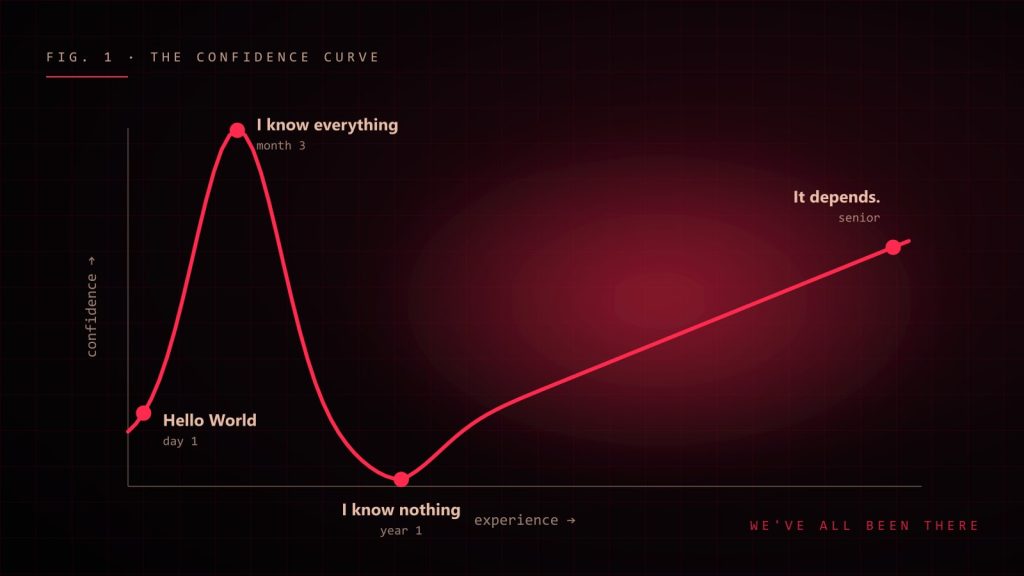
    Developer confidence curve from Hello World to I know everything to I know nothing to It depends
    The developer confidence curve. Most of us visit every point on it at least twice.

    1. Learn the fundamentals, not just the framework

    Frameworks come and go. I have watched jQuery rule the world, then politely leave the room. The things that stayed useful through every trend: how the browser renders a page, how HTTP works, how JavaScript handles async code, how data flows through an app.

    When you understand the fundamentals, a new framework is just new syntax for ideas you already know. When you don’t, every new framework feels like starting from zero.

    2. Read more code than you write

    Writers read books. Developers should read code. Open the source of a library you use every day. Read the pull requests of the best engineer on your team. You will steal (I mean, “learn”) patterns, naming habits and clever ways of handling edge cases that no tutorial teaches.

    3. Build things that are slightly too hard

    Tutorials feel productive, but they are like watching cooking shows: entertaining, educational, and you still can’t make dinner. Real growth happens when you build something just beyond your comfort zone and have to figure it out yourself.

    • Never built a real-time app? Make a tiny chat with WebSockets.
    • Curious about 3D? Put a rotating cube on a page with Three.js, then make it react to the mouse.
    • Only done front-end? Write the API for your own side project.

    You will get stuck. That is the part where the learning happens.
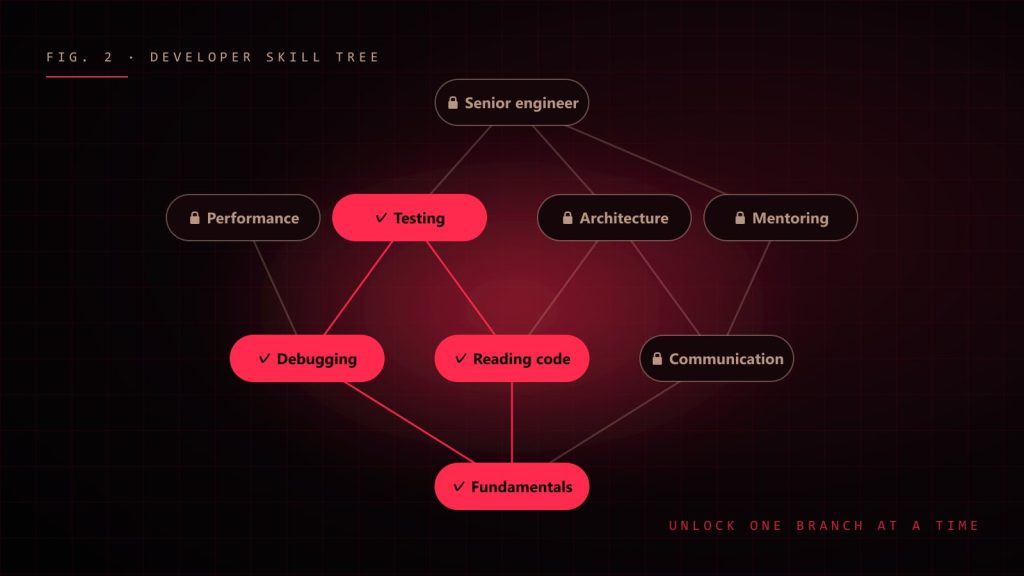
    Developer skill tree with fundamentals, debugging, reading code and testing unlocked
    Pick your next skill like a game skill tree: one branch at a time, with the basics unlocked first.

    4. Get good at debugging

    Debugging is the most underrated developer skill. Bad debugging is changing random things until the error goes away. Good debugging is a calm, boring, scientific process:

    1. Reproduce it. If you can’t make it happen on purpose, you can’t prove you fixed it.
    2. Read the actual error message. All of it. Yes, even the scary part.
    3. Form one hypothesis and test it. Change one thing at a time.
    4. Shrink the problem. Remove code until the bug disappears; the last thing you removed is your suspect.
    5. Write down the fix and the cause. Future you will hit the same bug. Future you deserves notes.

    5. Ask for feedback (and survive it)

    Code review comments can sting. “Why is this 400 lines?” feels personal. It isn’t. Treat every review as a free lesson from someone who spent their time on your growth. Ask senior developers “how would you have done this?” Most of them love answering, and you get years of experience in a ten-minute chat.

    6. Write things down

    Keep a simple “today I learned” file. Write short notes after solving a tricky problem. Explain things in a blog post, even if only five people read it. Explaining something is the fastest way to discover you don’t understand it yet, which is the first step to actually understanding it.

    7. Care about the user, not just the code

    The best developers I know don’t only ask “does it work?” They ask “is it fast on a cheap phone?”, “can someone use it with a keyboard?”, “will this confuse a new user?” Caring about the person on the other side of the screen turns a coder into a product engineer, and product engineers are the ones teams fight to keep.

    8. Protect your energy

    You can’t become a great developer while running on four hours of sleep and pure panic. Take breaks. Go outside. Close the laptop at a reasonable hour. Some of my best solutions arrived in the shower, on a walk or while washing dishes, never while staring harder at the screen.

    A simple weekly plan

    • One hour reading good code or docs.
    • One small experiment with something you don’t know yet.
    • One note about something you learned.
    • One question to someone more experienced.

    It doesn’t sound like much. Do it every week for a year and you won’t recognise your own code. Which, as we established, is exactly the point.
  • How AI Is Changing Programming (and What It Still Can’t Do)

    How AI Is Changing Programming (and What It Still Can’t Do)

    A few years ago, “AI writes code” sounded like science fiction or a sales pitch. Today, an AI assistant suggests the rest of my function before I have finished typing its name. Sometimes it is brilliant. Sometimes it confidently invents an API that has never existed, in a tone so sure of itself that I briefly doubt my own memory.

    So, is AI going to replace programmers? Make us ten times faster? Turn us into prompt typists? After using AI tools every day in real projects, my honest answer is: it changes the job a lot, but not in the way the headlines suggest.

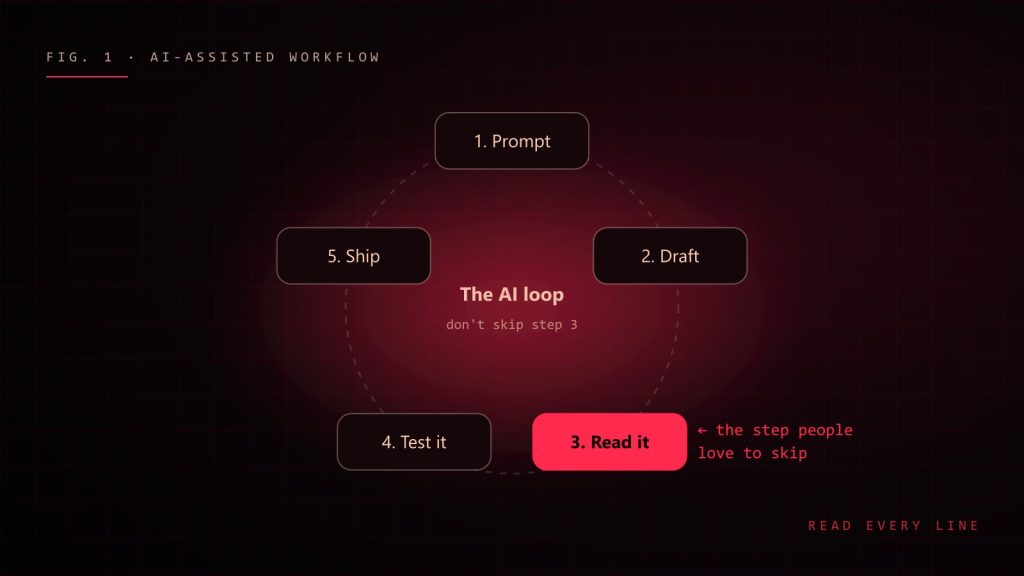
    The AI-assisted workflow loop: prompt, draft, read it, test it, ship
    The AI-assisted loop. The step that matters most is the one people love to skip.

    What AI is genuinely great at

    Let’s give credit where it is due. AI assistants are excellent at:

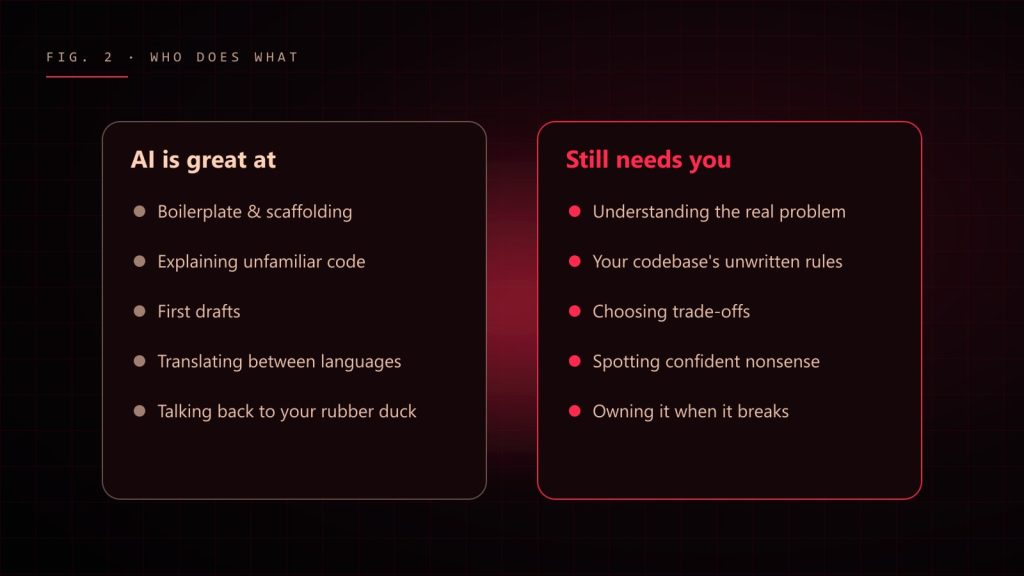
    • Boilerplate. Form validation, API types, test scaffolding, the fifteenth CRUD endpoint. Things you know how to write but would rather not.
    • Explaining unfamiliar code. “What does this regex do?” used to mean twenty minutes of squinting. Now it is a question.
    • Getting unstuck. A blank page is the hardest part of any task. A rough first draft, even a wrong one, gets your brain moving.
    • Translating between languages and frameworks. “Here is this function in PHP, give me the TypeScript version” is a solid time saver.
    • Rubber ducking that talks back. Explaining a bug to an AI often makes you spot it yourself, just like the classic rubber duck, except this duck has opinions.

    What still needs a human

    AI is a very fast, very well-read intern with no context, no memory of your last architecture meeting and absolutely no fear. That combination is powerful and occasionally terrifying. It struggles with:

    • Understanding the actual problem. It answers the question you asked, not the question you should have asked.
    • Your codebase’s unwritten rules. Why that service is never called directly, why the date field is stored as a string, why nobody touches legacy-utils.js.
    • Trade-offs. It can list options. Choosing the right one for your team, budget and deadline is still your job.
    • Being wrong quietly. When AI is wrong, it is wrong with perfect grammar and great confidence. That is the dangerous part.
    Two columns: what AI is great at and what still needs a human
    A rough map of where AI helps and where you are still very much needed.

    The skill that matters more now: reading code

    If AI writes more of the first draft, the human job shifts toward reviewing, testing and understanding. You become an editor more than a typist. That means the developers who benefit most are, ironically, the ones who already know their fundamentals well. You cannot spot a subtle bug in generated code if you don’t understand what correct code looks like.

    My rule: never commit code you could not explain to a teammate. If the AI wrote it and you can’t explain why it works, you don’t have a feature. You have a mystery with a deadline.

    How I actually use AI day to day

    1. Give context. Paste the relevant types, the error and what you expected. “Fix my code” gets generic answers; “this hook re-renders on every keystroke, here is the component” gets useful ones.
    2. Ask for options, not answers. “Give me two approaches and their trade-offs” leads to better decisions than “write it”.
    3. Read every line. Especially imports, edge cases and anything touching money, auth or user data.
    4. Test it. Generated code deserves the same tests as hand-written code. Possibly more.
    5. Keep secrets out. Never paste API keys, passwords or private customer data into a prompt.
    Weak prompt:
      "make this faster"
    
    Better prompt:
      "This React list re-renders all 2,000 rows when one item changes.
       Here is the component and the store. Suggest two fixes, explain
       the trade-offs, and don't change the public props."

    Will AI replace developers?

    It will replace some tasks developers do. It already has. Nobody misses hand-writing the same form validation for the hundredth time. But software is not just code; it is understanding people, untangling vague requirements, making trade-offs and taking responsibility when things break at 2 a.m.

    The developers I worry about are not the ones using AI. They are the ones who refuse to learn it, and the ones who use it without understanding what it produces. The sweet spot is in the middle: use AI to go faster, and use your brain to go in the right direction.

    Advice for people starting today

    • Learn the fundamentals properly. They are how you judge what the AI gives you.
    • Use AI to explain things, not just to do things for you.
    • Build real projects. AI can help write code; it cannot give you the experience of shipping and supporting something.
    • Practise reading other people’s code. In the AI era, that is half the job.

    AI did not end programming. It removed some of the boring parts and raised the bar for the thinking parts. Honestly? That’s a pretty good deal. Just double-check the imports.

  • Software Engineering Is Mostly Thinking (and a Little Typing)

    Software Engineering Is Mostly Thinking (and a Little Typing)

    When I tell people I am a software engineer, they picture me typing furiously in a dark room, green text raining down the screen, hacking into something important. The reality is less cinematic. Most days I am staring at a function, holding a coffee that went cold an hour ago, whispering “but why would it do that?”

    Software engineering is not mostly about typing. It is about thinking, reading, communicating and making trade-offs, with a little typing sprinkled on top. After more than ten years of building things for the web, from WordPress plugins to real-time 3D configurators, here is what I wish someone had told me on day one.

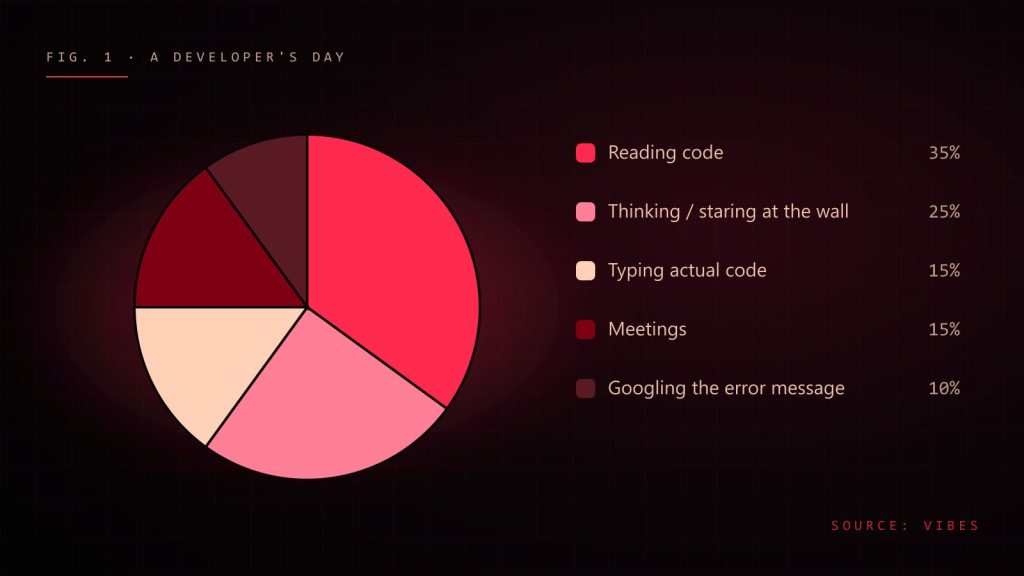
    Pie chart of a developer day: reading code 35%, thinking 25%, typing 15%, meetings 15%, googling errors 10%
    An honest breakdown of a developer's day. Your numbers may vary, especially the meetings slice.

    Programming vs. software engineering

    Programming is making the computer do something. Software engineering is making the computer do something for years, while other people change it, the requirements change, the framework releases a new major version and someone in marketing asks if it can “just also do this one small thing”.

    A good rule of thumb: programming is what you do alone; engineering is what you do with time and other people. The moment your code has to survive a colleague, a deadline or next year’s version of you, you are doing engineering.

    You read code far more than you write it

    Every line you write will be read many more times than it was written: by reviewers, by teammates fixing bugs at 6 p.m. on a Friday, and by future you, who will have no memory of writing it and will be personally offended by it.

    So optimise for the reader:

    • Name things like you mean it. data2, tempFinal and handleStuff are cries for help. unpaidInvoices and retryWithBackoff are documentation.
    • Keep functions small enough to fit in your head. If you need to scroll to understand it, your teammates need a map.
    • Comment the “why”, not the “what”. The code already says what it does. Tell me why it does it in this weird way, so I don’t “fix” it and break production.
    // Bad: tells me what I can already read.
    // Add 1 to retries
    retries += 1;
    
    // Good: tells me what the code can't.
    // The payment provider rate-limits bursts, so we back off
    // instead of retrying immediately (see incident 2024-11).
    await sleep(2 ** retries * 250);

    Simple beats clever (every single time)

    Clever code feels amazing to write. It is a little poem only you understand. Unfortunately, it is also a little trap only you can get out of. The best engineers I have worked with write code that looks almost boring. That is the point. Boring code is easy to read, easy to test and easy to delete.

    Before you add an abstraction, ask: “Do I have three real cases for this, or am I building a cathedral for one tent?” Duplicating two small things is often cheaper than inventing the wrong abstraction and living with it for two years.

    Bugs get more expensive the longer they live

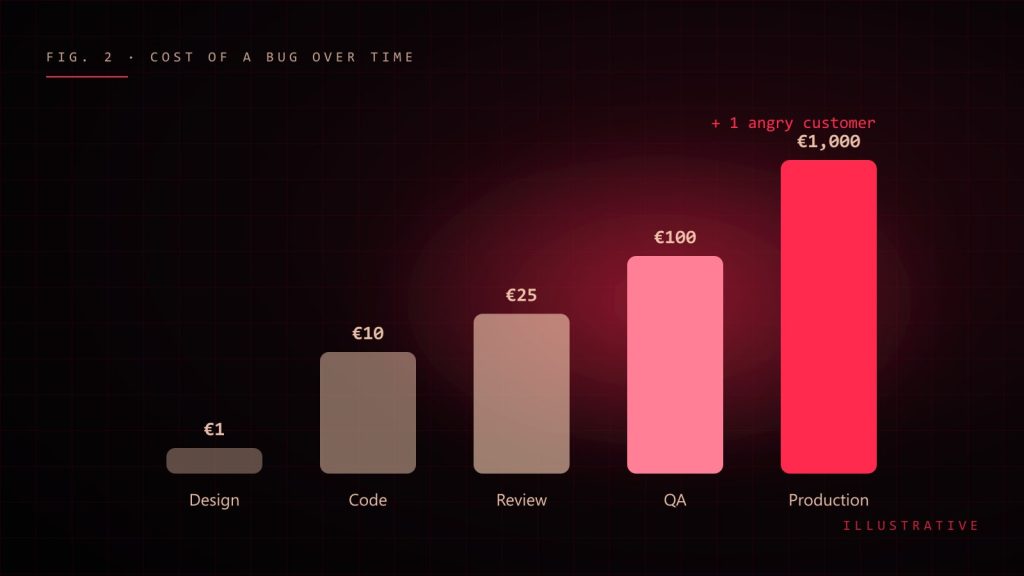
    A misunderstanding caught while sketching the solution costs a conversation. The same misunderstanding caught in production costs a hotfix, a postmortem, an apology email and possibly your weekend.

    Bar chart: the cost of a bug grows from design to production
    The life cycle of a bug's price tag. Illustrative, but anyone who has done a Friday hotfix will tell you it's not far off.

    That is why engineering habits that feel slow are actually fast:

    • Ask questions before you code. Five minutes of “what should happen when the list is empty?” saves five hours later.
    • Write tests for the scary parts. Not everything needs a test, but money, permissions and anything with dates absolutely does. Dates are cursed. Respect the curse.
    • Review code like a teammate, not a judge. The goal is a better product, not a scoreboard of who found the most typos.

    Every decision is a trade-off

    There is no “best” framework, database or architecture. There is only “best for this team, this problem and this deadline”. Junior engineers ask “what is the right answer?” Senior engineers answer “it depends”, and then, crucially, explain what it depends on.

    When you make a decision, write down:

    1. The problem you were solving.
    2. The options you considered.
    3. Why you picked this one, and what you gave up.

    Three short paragraphs. Future you will send present you a thank-you card.

    Communication is part of the job

    I used to think the “soft” skills were optional extras. Then I watched a technically perfect feature fail because nobody explained how it worked, and a slightly messy one succeed because the developer kept everyone in the loop. Writing clear pull request descriptions, giving honest estimates and saying “I’m stuck” early are engineering skills. They just don’t compile.

    Ship, learn, repeat

    Perfect software does not exist. Software that is in users’ hands, teaching you something, does. Ship small pieces, measure what happens, improve. A good engineer is not someone who never makes mistakes; it is someone who makes small mistakes quickly and big mistakes rarely.

    The short version

    • Write for the reader, especially future you.
    • Choose boring, simple solutions until you can’t.
    • Catch bugs early: questions, tests and kind reviews.
    • Every choice is a trade-off. Write it down.
    • Talk to humans. They are part of the system too.

    And reheat your coffee. Cold coffee has never fixed a bug, although I have tested this hypothesis extensively.

  • Frontend Architecture That Survives the Second Year

    Frontend Architecture That Survives the Second Year

    Most frontend codebases are pleasant for the first few months. Then the team grows, features pile up, and suddenly a small change touches nine files and breaks a page nobody was looking at. The decisions that prevent that are rarely about frameworks. They are about boundaries, data flow and habits.

    Organise by feature, not by file type

    A components/ folder with two hundred files, a hooks/ folder and a utils/ folder tells you what things are, not what they are for. Grouping by feature keeps related code together and makes ownership obvious:

    features/
      checkout/
        checkout-page.tsx
        payment-form.tsx
        use-cart-total.ts
        checkout.api.ts
        checkout.test.tsx
      profile/
        ...
    shared/
      ui/        # buttons, inputs, dialogs
      lib/       # formatting, dates, fetch client

    A simple rule keeps this healthy: features may import from shared, but not from each other. When two features need the same thing, promote it to shared deliberately.

    Keep state close to where it is used

    Global state is convenient on day one and expensive on day three hundred. Ask where each piece of state really belongs:

    • Server data belongs in a data layer with caching, such as React Query, SWR or server components, not copied into a global store.
    • URL state such as filters, tabs and pagination belongs in the URL, so it survives refreshes and can be shared.
    • Local UI state such as an open dropdown belongs in the component.
    • Truly global client state, like the current theme or a 3D scene’s settings, is the small remainder that justifies a store.

    When high-frequency values, such as pointer position in a render loop, change every frame, keep them out of React state entirely and read them where they are needed.

    Make components boring to use

    A good shared component has a small, predictable API. Prefer composition to configuration: a Card with slots ages better than a Card with twenty boolean props.

    // Hard to extend
    <Card title="Plan" showBadge badgeText="New" footerAlign="right" />
    
    // Easy to extend
    <Card>
      <Card.Header>Plan <Badge>New</Badge></Card.Header>
      <Card.Footer className="justify-end">...</Card.Footer>
    </Card>

    Let types document the edges

    TypeScript pays off most at boundaries: API responses, component props and shared utilities. Validate data where it enters the app, then trust the types inside. A runtime schema at the API boundary catches backend changes before they become blank screens:

    import { z } from "zod";
    
    const Post = z.object({
      id: z.number(),
      title: z.string(),
      publishedAt: z.string().datetime(),
    });
    
    export type Post = z.infer<typeof Post>;
    
    export async function getPost(id: number): Promise<Post> {
      const response = await fetch(`/api/posts/${id}`);
      return Post.parse(await response.json());
    }

    Test behaviour, not implementation

    Tests that assert on internal state break every refactor and catch few real bugs. Tests that act like a user (type into the field, click the button, expect the message) survive refactors and protect what matters. A practical mix:

    • Unit tests for pure logic: pricing, formatting, reducers.
    • Component tests with Testing Library for important interactions.
    • A handful of end-to-end tests for the flows that make money or keep users safe.

    Automate the arguments away

    Formatting, import order and common mistakes should never come up in code review. A formatter, a strict linter and type checks in CI free reviewers to discuss design and behaviour. Add a performance budget too: a bundle-size check on pull requests catches the accidental 300 KB dependency before it ships.

    Write down the decisions

    The hardest knowledge to recover is why something was built a certain way. A short decision record (context, options, choice and consequences) takes ten minutes and saves hours when someone later wonders whether that odd pattern is safe to remove.

    In short

    • Group by feature; keep cross-feature imports out.
    • Put state where it belongs: server, URL, component, then store.
    • Design components for composition.
    • Validate at the edges, trust types inside.
    • Test what users do.
    • Automate style; document decisions.

    Architecture is not about predicting the future. It is about making the next change easy, and the one after that.