Tag: Productivity

  • Remote Work, Done Right: 8 Rules for Real Results

    Remote Work, Done Right: 8 Rules for Real Results

    Remote work is not “office work, but in pyjamas”. If you treat it that way, it will quietly eat your focus, your evenings and your sanity. If you treat it as its own discipline, it is the most productive way I have ever worked.

    I have worked remotely with teams across Iran, Spain, Türkiye, Oman and Germany, across time zones, languages and very different internet speeds. Here is the playbook. No fluff. No “just stay motivated!”. Rules that work.
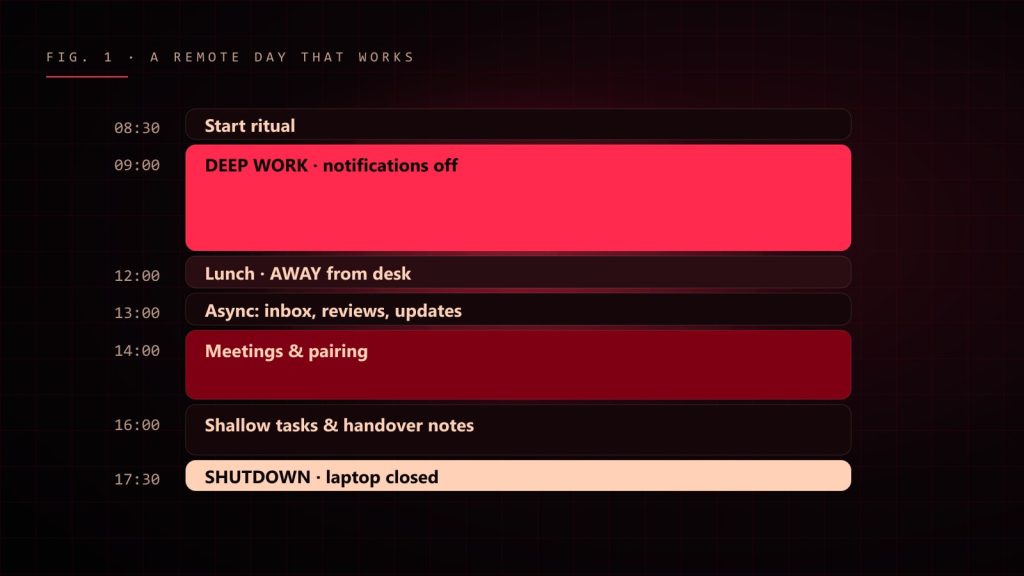
    Timeline of a productive remote day from start ritual to shutdown
    A remote day that actually works. Notice the lunch break is not at the desk.

    Rule 1: Own your schedule, or it will own you

    No commute means no natural start and end to your day. Without one, work leaks into everything: breakfast, dinner, that moment you were supposed to be watching a film.

    • Start at a fixed time. Same time every day. Your brain loves a routine.
    • Block deep work first. Two to three hours of focus, before Slack wakes up. Protect this time like your salary depends on it, because it does.
    • End with a shutdown ritual. Write tomorrow’s top three tasks, close every tab, say “done” out loud if you have to. Then close the laptop.

    Rule 2: Over-communicate. Then communicate a bit more.

    In an office, people see you working. Remotely, if you don’t write it, it didn’t happen. Silence looks like “stuck” or “slacking”, even when you are doing your best work.

    • Post a short daily update: what you did, what’s next, what’s blocking you.
    • Say “I’m stuck” early. Two hours stuck in silence is a waste. Ten minutes stuck and a quick question is teamwork.
    • Write complete messages. Not “hi” and then wait. Hi + context + question + deadline, in one message.

    Remote golden rule: write every message so that someone in another time zone can act on it without asking you a single follow-up question.

    Rule 3: Default to async. Meet on purpose.

    Meetings are the most expensive thing in a remote team. Five people for an hour is five hours of focus gone. Most “quick syncs” should be a written message, a short video or a comment in the ticket.
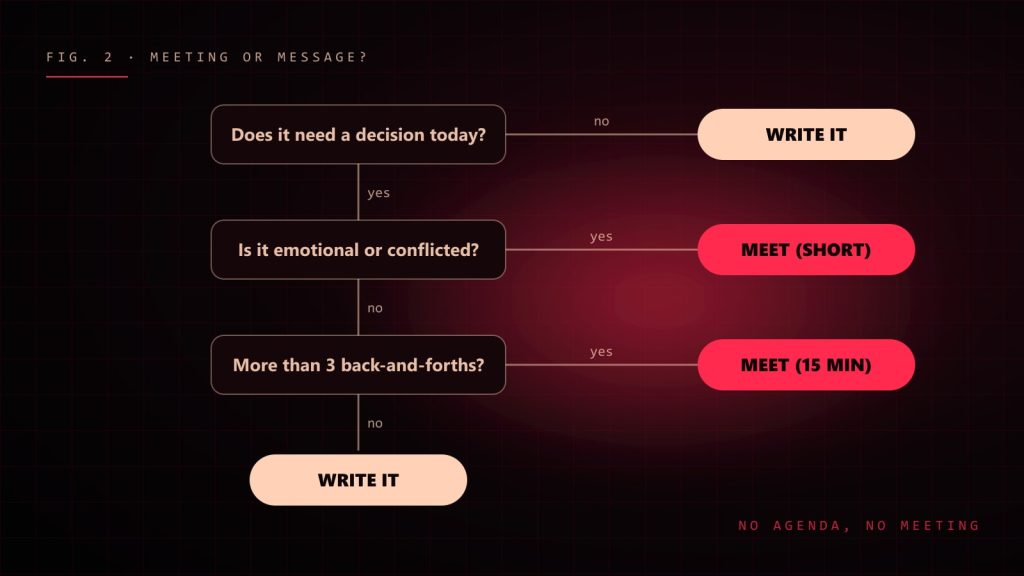
    Flowchart deciding between writing a message and holding a meeting
    Before you send that meeting invite, run it through this. Most things are a message.

    Meet when you need to decide something hard, resolve a conflict or build trust. And when you do meet: agenda first, notes after, decisions written down. No agenda, no meeting.

    Rule 4: Build a workspace you’d actually want to sit in

    Your kitchen table is not an office. Your bed is definitely not an office. Your back will send you an invoice for every month you pretend otherwise.

    • A real desk at the right height, ideally one you can stand at too.
    • A proper chair, an external monitor at eye level, a decent headset.
    • Good light, preferably daylight from the side, not behind you.
    • A door, if you have one. Closing it is your commute.

    Yes, I build desk configurators for a living. Yes, I am biased. I am also right.

    Rule 5: Measure output, not hours

    Nobody cares how long your status was green. They care what shipped. Set clear goals for the week, deliver them, show them. Teams that judge remote people by “online time” get people who are online and doing nothing. Teams that judge by results get results.

    Rule 6: Respect time zones like they’re law

    • Put your working hours in your profile and calendar.
    • Schedule messages instead of pinging people at 11 p.m. their time.
    • Rotate meeting times so the same people don’t always take the 7 a.m. call.
    • Write handover notes at the end of your day so work keeps moving while you sleep.

    Rule 7: Fight loneliness on purpose

    Remote work can get lonely, fast. You will not notice until it’s a problem. So plan against it:

    • Have a non-work chat channel and actually use it. Pets, food, terrible jokes.
    • Do the occasional camera-on coffee chat with no agenda.
    • Work from a café or coworking space once a week.
    • Have a life outside the screen: sport, friends, a hobby. This is not optional.

    Rule 8: Guard your focus like a dragon guards gold

    • Turn off notifications during deep work. All of them.
    • Batch your inbox and chat into a few slots a day.
    • One task at a time. Multitasking is just doing several things badly in parallel.
    • Phone in another room. I know. Do it anyway.

    The remote cheat sheet

    1. Fixed start, real shutdown.
    2. Deep work before chat.
    3. Write it down, or it didn’t happen.
    4. Async by default, meetings with agendas.
    5. A proper desk setup. Your body is not a beta tester.
    6. Output over online time.
    7. Time zones are sacred.
    8. Stay human: people, movement, daylight.

    Remote work rewards discipline and punishes drifting. Get the rules right, and you get the best of both worlds: deep focus, real results, and lunch in your own kitchen. Just not at your desk.
  • How AI Is Changing Programming (and What It Still Can’t Do)

    How AI Is Changing Programming (and What It Still Can’t Do)

    A few years ago, “AI writes code” sounded like science fiction or a sales pitch. Today, an AI assistant suggests the rest of my function before I have finished typing its name. Sometimes it is brilliant. Sometimes it confidently invents an API that has never existed, in a tone so sure of itself that I briefly doubt my own memory.

    So, is AI going to replace programmers? Make us ten times faster? Turn us into prompt typists? After using AI tools every day in real projects, my honest answer is: it changes the job a lot, but not in the way the headlines suggest.

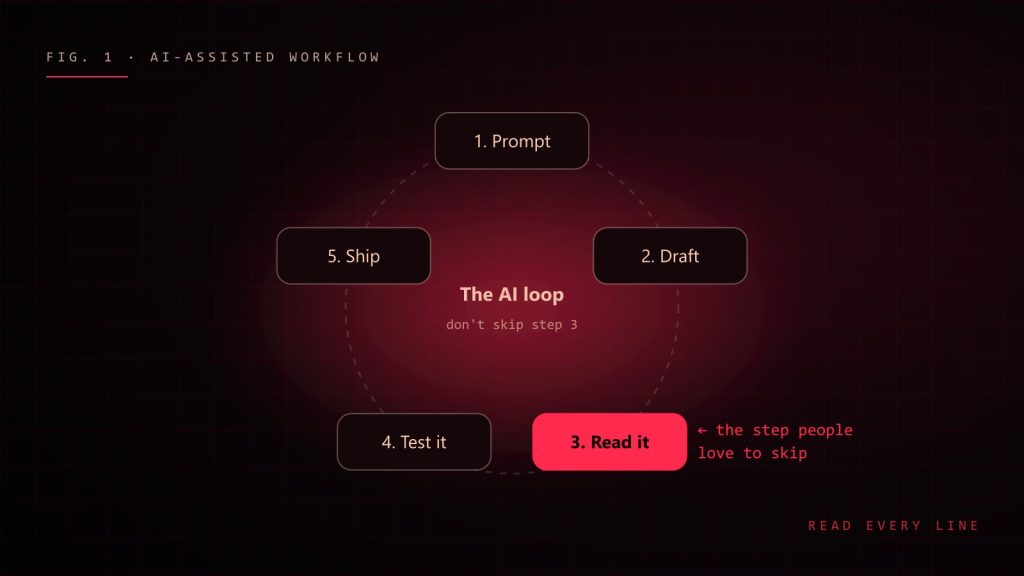
    The AI-assisted workflow loop: prompt, draft, read it, test it, ship
    The AI-assisted loop. The step that matters most is the one people love to skip.

    What AI is genuinely great at

    Let’s give credit where it is due. AI assistants are excellent at:

    • Boilerplate. Form validation, API types, test scaffolding, the fifteenth CRUD endpoint. Things you know how to write but would rather not.
    • Explaining unfamiliar code. “What does this regex do?” used to mean twenty minutes of squinting. Now it is a question.
    • Getting unstuck. A blank page is the hardest part of any task. A rough first draft, even a wrong one, gets your brain moving.
    • Translating between languages and frameworks. “Here is this function in PHP, give me the TypeScript version” is a solid time saver.
    • Rubber ducking that talks back. Explaining a bug to an AI often makes you spot it yourself, just like the classic rubber duck, except this duck has opinions.

    What still needs a human

    AI is a very fast, very well-read intern with no context, no memory of your last architecture meeting and absolutely no fear. That combination is powerful and occasionally terrifying. It struggles with:

    • Understanding the actual problem. It answers the question you asked, not the question you should have asked.
    • Your codebase’s unwritten rules. Why that service is never called directly, why the date field is stored as a string, why nobody touches legacy-utils.js.
    • Trade-offs. It can list options. Choosing the right one for your team, budget and deadline is still your job.
    • Being wrong quietly. When AI is wrong, it is wrong with perfect grammar and great confidence. That is the dangerous part.
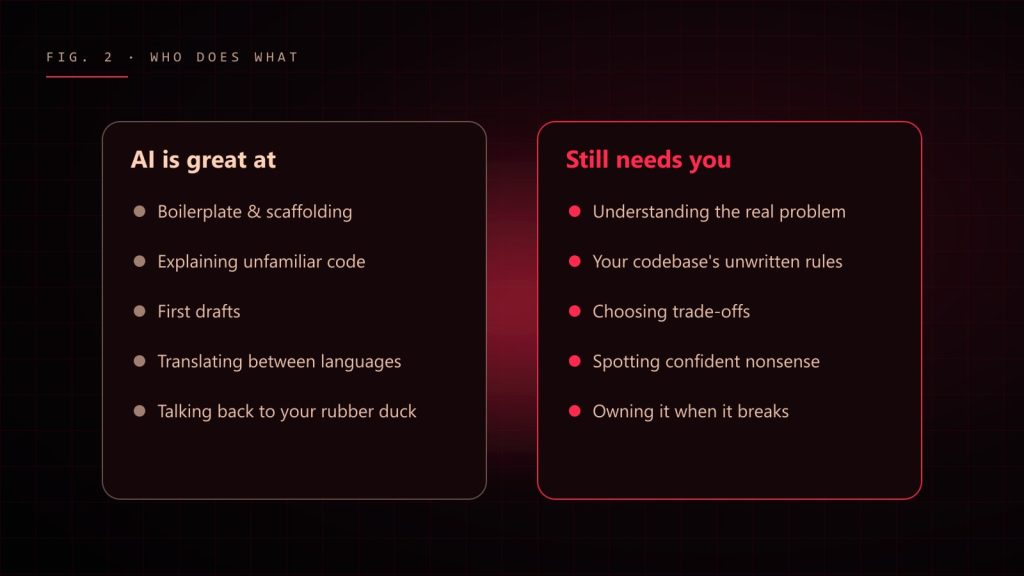
    Two columns: what AI is great at and what still needs a human
    A rough map of where AI helps and where you are still very much needed.

    The skill that matters more now: reading code

    If AI writes more of the first draft, the human job shifts toward reviewing, testing and understanding. You become an editor more than a typist. That means the developers who benefit most are, ironically, the ones who already know their fundamentals well. You cannot spot a subtle bug in generated code if you don’t understand what correct code looks like.

    My rule: never commit code you could not explain to a teammate. If the AI wrote it and you can’t explain why it works, you don’t have a feature. You have a mystery with a deadline.

    How I actually use AI day to day

    1. Give context. Paste the relevant types, the error and what you expected. “Fix my code” gets generic answers; “this hook re-renders on every keystroke, here is the component” gets useful ones.
    2. Ask for options, not answers. “Give me two approaches and their trade-offs” leads to better decisions than “write it”.
    3. Read every line. Especially imports, edge cases and anything touching money, auth or user data.
    4. Test it. Generated code deserves the same tests as hand-written code. Possibly more.
    5. Keep secrets out. Never paste API keys, passwords or private customer data into a prompt.
    Weak prompt:
      "make this faster"
    
    Better prompt:
      "This React list re-renders all 2,000 rows when one item changes.
       Here is the component and the store. Suggest two fixes, explain
       the trade-offs, and don't change the public props."

    Will AI replace developers?

    It will replace some tasks developers do. It already has. Nobody misses hand-writing the same form validation for the hundredth time. But software is not just code; it is understanding people, untangling vague requirements, making trade-offs and taking responsibility when things break at 2 a.m.

    The developers I worry about are not the ones using AI. They are the ones who refuse to learn it, and the ones who use it without understanding what it produces. The sweet spot is in the middle: use AI to go faster, and use your brain to go in the right direction.

    Advice for people starting today

    • Learn the fundamentals properly. They are how you judge what the AI gives you.
    • Use AI to explain things, not just to do things for you.
    • Build real projects. AI can help write code; it cannot give you the experience of shipping and supporting something.
    • Practise reading other people’s code. In the AI era, that is half the job.

    AI did not end programming. It removed some of the boring parts and raised the bar for the thinking parts. Honestly? That’s a pretty good deal. Just double-check the imports.